



Phjoy App: Mobile Casino Access, Setup and Everyday Use
Phjoy App brings account access, casino games, payments, promotions, and support into one mobile space. Before installing it, it helps to know where the file comes from, how Android and iOS setup differs, what remains available in a browser, and which security checks deserve attention.
Phjoy App in Everyday Use
The main reason to install the App is simple: It removes a few steps from something you may already do regularly. Instead of opening a browser, finding the correct page, signing in again, and navigating back to the lobby, the App gives you a direct route from the phone’s home screen. That difference sounds small until you use the same account several times a week.
Inside Phjoy, the account remains the center of everything. Your balance, games, promotions, transaction functions, settings, and support access belong to the same account rather than becoming a separate mobile-only experience. The App makes the most sense when you regularly move between several parts of the lobby. You might open a slot, check your balance afterward, move into a live casino room, then return to the wallet before leaving. Having those functions inside one installed environment can feel cleaner than maintaining several browser tabs.
It is still important to keep expectations realistic. Installing an App does not improve game odds, change RTP, make a bet more likely to win, or automatically make a withdrawal faster. Its advantage is mainly access and usability.
App Access Versus Browser Access
Neither option is automatically better. The App suits repeated use, while browser access suits people who want fewer things installed on their phones. A player who logs in almost every evening will notice the convenience of a home-screen icon. Someone who visits twice a month may barely notice the difference.
The useful question is not whether an App sounds more convenient. It is whether it removes enough friction from your own routine to justify installing and maintaining it.
Installing the Phjoy App Safely
Installation deserves more attention than the download button itself. Casino APK files can be copied, renamed, and redistributed, so the first decision happens before anything reaches your phone.
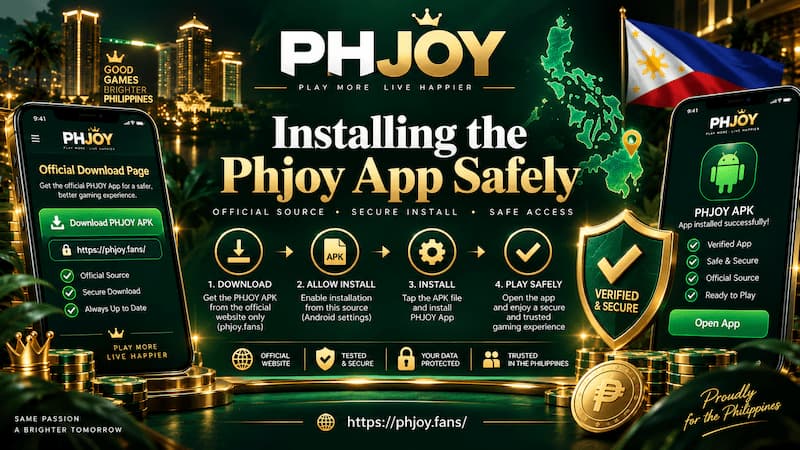
Installing the Phjoy App Safely
Android APK Installation
Android users may encounter a direct APK installation rather than a normal Google Play installation. That changes the process slightly.
A sensible installation sequence is:
- Open the current Phjoy download page directly on the Android phone.
- Select the Android App download.
- Let the APK finish downloading completely.
- Open the file from the browser or Downloads folder.
- Review any Android installation permission shown on screen.
- Allow installation only for the browser or file manager being used when required.
- Complete installation and open the App.
- Remove unnecessary installation permission afterward if you do not need it anymore.
Modern Android versions commonly manage permission for installing unknown apps by source. For example, Chrome may be allowed to install one APK without giving every other application on the phone the same permission. That distinction matters because a vague tutorial telling you to “enable Unknown Sources” everywhere may be based on much older Android behavior.
iPhone and iPad Setup
iOS installation can be less consistent because the available method may change. Instead of following an old screenshot or an installation tutorial saved months ago, use the method currently presented during the Phjoy download process. Depending on availability, mobile access may involve Safari, a profile-based installation process, or another supported method.
Treat unexpected configuration-profile requests carefully. An iPhone should not be trusted simply because the screen carries a familiar logo. If the installation steps suddenly differ from what you saw on the intended download route, stop and verify where the new instruction came from.
Moving Around the App Lobby
A good App becomes useful when navigation fades into the background. You should spend time choosing a game, not repeatedly searching for the same menu.
The lobby can contain different categories depending on current availability, including:
- Slots
- Live casino tables
- Fishing games
- Poker and card-style games
- Sports sections where available
Slots are usually the quickest category to browse because individual games can be opened and closed rapidly. Live casino play is different. When moving between tables, the quality of navigation becomes more noticeable because you may be checking dealers, table limits, game types, or available seats before entering.
The same applies when switching between familiar games such as Baccarat, Blackjack, Roulette, Dragon Tiger, or slot titles from different providers. Returning to the main lobby should feel obvious rather than forcing you to restart your session.
Account and Wallet Access
Games are only half of normal App use. Regular users also need quick access to:
- Current balance
- Deposit and withdrawal functions
- Transaction records
- Promotions or reward areas
- Account settings
- Customer support
- Logout and security controls
This is where a practical mobile layout becomes valuable. If you have to close a game just to confirm whether a transaction was credited, finding the wallet quickly matters more than flashy lobby artwork. The account should also remain recognizable across devices. Opening the same account in a browser and in the App should not feel like managing two separate identities.
Payments and App-Linked Rewards
Payment decisions deserve more attention than speed. When dealing with Peso transactions, use the details displayed during the current payment process rather than saving an old account number or copying payment instructions from a months-old screenshot. Deposit channels can change, and an outdated destination is more serious than a broken game shortcut.
Before confirming a transaction, check:
- Minimum and maximum amount
- Recipient or payment-channel details
- Account information entered
- Any stated processing conditions
- Withdrawal requirements connected to the deposit
The App may make reaching the wallet quicker, but it should not encourage rushed payments.
Read the Bonus Conditions Before Claiming
App downloads and registrations can sometimes be connected with promotions. The headline amount is usually the least important part of the decision because the actual value depends on the conditions attached to it.
Before claiming anything, check whether the offer requires:
- A new account
- A qualifying deposit
- Minimum turnover
- Specific eligible games
- A claim within a fixed period
- Completion of account verification
- Use before an expiry date
A “download bonus” may sound like a reward simply for installing the App, while the detailed conditions can involve several additional steps. Treat current promotion information as the final source for the offer you are actually claiming because old banners, screenshots, and social posts can remain online long after the terms have changed.
App or Mobile Browser?
The choice becomes clearer once you look at how you actually use your phone.

App or Mobile Browser?
Regular Mobile Use
The App fits better when you:
- Log in frequently.
- Play mainly from one personal phone.
- Want direct home-screen access.
- Switch between games, wallet functions, and promotions often.
- Do not mind installing occasional updates.
Imagine opening Phjoy most evenings after dinner. You usually check your balance, play Baccarat for a while, browse a few slots, then leave. Saving several browser steps every session can be worthwhile. The benefit grows through repetition rather than through any special gaming advantage.
Occasional Browser Use
Browser access can be the smarter choice when you:
- Log in only occasionally.
- Have limited phone storage.
- Prefer not to install APK files.
- Use more than one device.
- Are accessing your account temporarily.
- Want to check something quickly without changing phone settings.
For example, if you only open the account to check a withdrawal or play for a short session on weekends, installing another application may add more maintenance than convenience.
The App reduces repeated access friction. The browser reduces installation commitment.
Security Checks Before Signing In
The most expensive App mistake is not usually choosing the wrong slot. It is entering account credentials into something that only looks legitimate.
Verify the Download Source
A copied logo proves very little, and APK filenames can also be imitated easily. Before signing in after installation, check several details together:
- You reached the download through the intended Phjoy address.
- The browser did not redirect unexpectedly to an unrelated domain.
- The APK did not come from a random file-sharing page.
- Installation did not request permissions unrelated to normal casino use.
- The login screen matches the route you intentionally opened.
Be particularly careful with download links received in unsolicited Telegram messages, Facebook comments, SMS messages, or private chats. Even when a sender claims a link contains a “new version,” there is little reason to bypass the normal download route without verifying it first.
Treat Updates Like New Downloads
People often become less cautious after the first installation. That is exactly when an unusual update deserves attention.
Suppose the App has worked normally for three months, then a message suddenly directs you to a completely different domain and asks you to install another APK. The previous version being legitimate does not automatically make the new file legitimate, so the update source should be checked again.
The same rule applies if an update unexpectedly requests new permissions or asks for an unfamiliar iOS profile. Familiarity should not replace verification.
Fixing Common App Problems
Most App problems are less dramatic than they initially appear.
APK Will Not Install
Check storage first. A completed download still needs additional free space for installation. Then confirm:
- The APK finished downloading.
- Android allows installation from the browser or file manager being used.
- An older conflicting installation is not blocking the process.
- The file came from the current Phjoy download route.
Deleting and repeatedly downloading the same file should not be the first response if the actual problem is an Android permission.
Games Open Slowly or Do Not Load
Try switching between Wi-Fi and mobile data, reopen the App, and test another game. If several games fail at once, also try the browser version. That comparison helps separate an App-specific problem from a connection or service issue.
Avoid reinstalling immediately. Reinstallation can create more work when a temporary network interruption is the real cause.
Login Fails After an Update
Do not create a second account simply because a login attempt fails. Start with the existing credentials and confirm that you are using the correct App. If possible, try the same account through the browser.
If the browser accepts the login but the App does not, the account itself may be fine. That gives support a much clearer problem to investigate.
Choosing the App for Regular Phjoy Access
The Phjoy App earns its place on a phone through repetition. Someone who enters the lobby regularly, moves between games and wallet functions, and prefers direct access is more likely to benefit from installing it. A casual user can reasonably stay with the browser.
Before installation, keep three checks in order:
- Source: Know exactly where the file comes from.
- Installation: Read the permission or profile request instead of approving it automatically.
- Account: Confirm you are signing into the intended Phjoy environment before entering credentials or moving money.
Convenience is useful. Convenience combined with careful account habits is better.