



Phjoy Deposit: Methods, Limits, Bonuses & Checks
Deposit at Phjoy starts with three decisions: How you want to pay, how much you want to transfer, and whether a promotion should be attached to the transaction. Those choices look simple, but checking them before sending money can prevent delays, duplicate payments, and unwanted bonus conditions.
Phjoy Deposit Methods
Deposit menu gives several ways to fund an account, so there is no need to depend on a single wallet or banking route. Current options include GCash, Maya, GCashQR, GCASHPAY2, GrabPay, and Online Banking.
The useful difference between these choices is not simply the logo beside each one. Each method can lead to a different payment flow, channel, promotion, or set of instructions after the deposit request is submitted.
GCash
GCash is one of the most flexible choices because more than one channel can appear after it is selected. Current options include:
- G-Cash Ch.20
- G-Cash Ch.14
- G-Cash Ch.17
Think of these as separate routes under the same payment method. If you normally use GCash, that does not mean you should ignore the channel selection and jump directly to the amount.
For example, suppose you want to deposit ₱800 to Phjoy. You might select GCash, choose G-Cash Ch.20, enter or select ₱800, review the promotion choice, and then continue. If Ch.20 is unavailable during another transaction, Ch.14 or Ch.17 may provide another route.
Use the channel displayed for the current transaction rather than assuming the previous one will always be the correct choice.
Maya
Maya provides another familiar wallet route. A Cashback 2% label may appear beside the Maya option, making it naturally attractive to anyone comparing payment methods.
The label alone should not decide the deposit.
Before choosing Maya specifically for cashback, check the current promotion conditions attached to it. Cashback eligibility can depend on the active offer, qualifying amount, or other transaction requirements.
A payment method you already use comfortably can still be the better choice even without an extra incentive. Convenience, correct payment details, and easy transaction tracking have practical value too.
GCashQR and GCASHPAY2
GCashQR and GCASHPAY2 should be treated as separate Deposit methods rather than interchangeable names for ordinary GCash.
A QR-based route may require you to scan payment information generated for that transaction. GCASHPAY2 may follow its own instructions after you apply for the deposit.
That distinction becomes important when you have made deposits before. Old screenshots, saved QR codes, or previously used receiving details should not automatically be reused.
Always follow the payment information generated for the current Deposit request. A successful previous transfer does not guarantee that the same channel or receiving details are still assigned to the next one.
GrabPay and Online Banking
GrabPay gives another wallet option, while Online Banking is useful when you prefer to transfer through a bank rather than an e-wallet.
The choice between them can come down to something very practical: Which account already has the funds you want to use?
Moving money from a bank to a wallet just to deposit can create an unnecessary extra step. Likewise, using Online Banking may be less convenient if the funds are already sitting in GrabPay or GCash.
Deposit Amounts and Limits
The current Deposit screen displays a transaction range of ₱100 to ₱50,000.

Deposit Amounts and Limits
Several preset amounts are available:
- ₱100
- ₱300
- ₱500
- ₱800
- ₱1,000
- ₱3,000
- ₱5,000
- ₱8,000
- ₱10,000
- ₱20,000
These buttons are shortcuts, not the complete Deposit limit.
That difference is easy to miss. The highest preset button is ₱20,000, while the displayed maximum Deposit limit is ₱50,000. A user wanting another permitted amount can use the manual amount field when the selected payment route allows it.
For example, a ₱6,500 Deposit does not have its own preset button. Instead of choosing ₱5,000 or ₱8,000 simply because those buttons are visible, enter the intended amount manually and check it before continuing.
The same habit helps prevent a common mistake: An extra zero can turn ₱1,000 into ₱10,000 very quickly.
Choosing a Deposit Channel
The best Deposit method is the one you can complete correctly and verify afterward. That will not always be the option carrying the biggest-looking promotion.
Before selecting a channel, compare four things:
- Access: Is the money already in GCash, Maya, GrabPay, or your bank?
- Current availability: Is the payment channel selectable right now?
- Payment process: Will you transfer manually, scan a QR code, or follow banking instructions?
- Promotion: Is an offer attached, and do you actually want its conditions?
Consider someone with ₱3,000 already available in GCash. Choosing GCash can be simpler than transferring the money to Maya just because Maya displays a cashback label.
Another user may already keep funds in a bank account and prefer Online Banking because the transaction can be matched easily with a bank reference number.
There is no universal “best” Deposit route. The sensible choice changes with the source of your funds and the payment instructions available at that moment.
Deposit Promotions
Promotions deserve attention before the payment is sent, not afterward.
The Deposit screen can present a First Deposit Bonus (1/1) together with an option to Do not participate in any promotions. That second choice is important because it means a deposit does not automatically have to be tied to a bonus.
First Deposit Bonus
A first-deposit offer can add extra value when its conditions fit the way you intend to use the balance.
Before opting in, check details such as:
- Minimum qualifying Deposit
- Bonus amount or percentage
- Eligible games
- Wagering requirement
- Offer validity
- Maximum bet restrictions, if applicable
- Withdrawal conditions
The Deposit screen indicates that the First Deposit Bonus can be associated with a qualifying deposit, but current promotion rules should decide whether you select it.
Do not judge a bonus only by the extra amount shown at the beginning. A larger bonus can also come with more conditions before a withdrawal can be made.
Depositing Without a Promotion
Selecting Do not participate in any promotions can be a deliberate choice rather than a missed opportunity.
A player depositing ₱1,000 simply to use existing account funds without bonus conditions may prefer the cleaner transaction. Another player making a first deposit may decide that the bonus terms fit their plans and opt in.
Both choices can make sense. The key is knowing which one you selected before pressing the Deposit button.
How to Make a Deposit
Once the method and amount are decided, the actual process is straightforward.
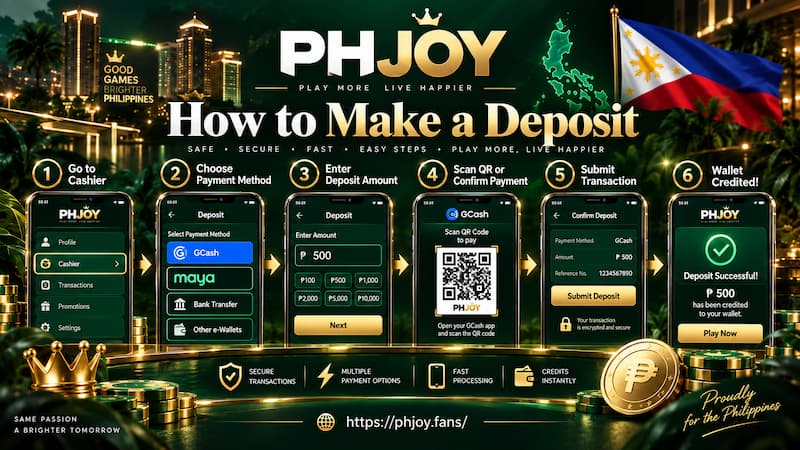
How to Make a Deposit
- Open Personal Center.
- Select Deposit.
- Choose GCash, Maya, GCashQR, GCASHPAY2, GrabPay, or Online Banking.
- If several channels appear, select the one you intend to use.
- Choose a preset amount or enter your amount manually.
- Confirm that it falls within the displayed Deposit limit.
- Select the relevant promotion or choose Do not participate in any promotions.
- Review the method, channel, amount, and promotion selection.
- Press Apply for Deposit.
- Follow the payment instructions generated for that transaction.
- Keep the receipt, payment reference, or confirmation screen until the balance is credited.
That final record is useful even when everything normally works smoothly. A transaction ID can identify one specific payment much faster than saying, “I deposited ₱1,000 earlier.”
Checking a Deposit After Payment
A Deposit is not finished simply because the wallet or bank says the transfer was successful. Confirm that the money is reflected correctly in the account as well.
Start by checking the balance. Then open Deposit History and find the matching transaction.
Compare:
- Deposit amount
- Payment time
- Selected payment route
- Transaction status
- Wallet or bank reference
If the balance has not updated yet, keep the original payment confirmation and transaction ID.
Avoid immediately sending the same amount again. Two identical ₱500 transfers made several minutes apart can make the situation harder to trace, especially when the first payment is simply waiting to be credited.
A cleaner approach is to identify the original transaction first and use its exact payment details if assistance is needed.