


PHJOY Withdrawal: Clear Steps to Cash Out Safely
Withdrawal at PHJOY begins in the Personal Center, where you choose GCash or Maya, check the available amount, enter a cash-out value, add the transaction password, and submit. The key is knowing which balance is actually withdrawable before you confirm.
PHJOY Withdrawal at a Glance
Withdrawal is the point where account balances, wallet details and security settings all meet. Inside PHJOY, an online casino serving the Philippines market, cash-out requests are handled through Personal Center → Withdrawal, with GCash and Maya available as the main visible e-wallet choices.
The form is compact, but several numbers deserve attention before pressing Submit. You can see Central Wallet, Available Amount, preset Peso amounts, a custom withdrawal field, the transaction-password box and your remaining number of withdrawals for the day.
The current withdrawal range is ₱100 to ₱20,000 per request. Preset buttons cover common values from ₱100 up to ₱20,000, while the bottom of the form can display Remaining Number of Withdrawal Today: 20.
A balance in the account is not automatically the same thing as money currently available to withdraw. Check Available Amount before choosing the cash-out value.
That distinction saves more time than repeatedly pressing Submit when the amount is not yet eligible.
Set Up GCash or Maya Before Withdrawal
GCash and Maya are familiar choices for Peso transactions, but the wallet itself should be ready before you start entering withdrawal amounts.
Select the Correct E-Wallet
At the top of the Withdrawal section, choose the wallet you want to receive the funds through. If GCash is already linked and that is where you want the money sent, select GCash before entering the amount. The same applies to Maya.
Before submitting, confirm:
- The intended e-wallet is selected.
- The linked wallet details are correct.
- The account information matches the details required by PHJOY.
- You still have access to the chosen wallet.
Changing payment details at the last moment can create unnecessary confusion, especially when account verification is still being completed.
Keep Security Details Private
The withdrawal form requires a Transaction Password. Treat it as a payment credential, not as an ordinary lobby password.
Do not send your transaction password, OTP or wallet login credentials to another person. A legitimate cash-out request should be completed inside your own account.
Check Available Amount Before Choosing a Value
The two balance figures near the top of Withdrawal can look similar, yet they answer different questions.
Central Wallet and Available Amount
Central Wallet reflects money held in the central account wallet. Available Amount is the figure that matters when deciding how much can currently be withdrawn.
Suppose the Central Wallet reads ₱5,000, but Available Amount is only ₱3,200. Requesting ₱5,000 simply because that number appears in Central Wallet is the wrong starting point. The usable withdrawal figure is ₱3,200 unless the available balance changes.
Several account conditions can affect this figure, including funds still tied to game activity or an unfinished wagering requirement connected to a bonus.
Refresh the Balance When the Numbers Look Outdated
A Refresh Balance control appears under the withdrawal amount field. It is useful when money has just returned from a game wallet or when you expect the available amount to have changed.
Refresh does not bypass withdrawal conditions. It simply helps you see the latest balance before making another decision.
That difference is important. If Available Amount remains at zero after refreshing, submitting the same request repeatedly will not solve the underlying issue.
Choose the Withdrawal Amount
PHJOY provides preset amounts so you do not need to type every common value manually.
Preset Peso Amounts
The visible choices include:
- ₱100
- ₱300
- ₱500
- ₱800
- ₱1,000
- ₱2,000
- ₱5,000
- ₱10,000
- ₱15,000
- ₱20,000
The manual field currently displays an accepted range of ₱100–₱20,000.
These buttons are more useful than they first appear. If your Available Amount is ₱2,350 and you only want to withdraw ₱2,000, one tap avoids an unnecessary typing error. If the available balance is ₱850, choosing the ₱800 button keeps the request comfortably within the displayed balance.
Match the Amount to the Current Balance
Do not treat ₱20,000 as a target simply because it is the highest visible option. The correct amount depends on the balance currently available and any account conditions still in force.
For example, if Available Amount is ₱10,500, a ₱10,000 request fits the displayed balance. A ₱15,000 request does not, even if the Central Wallet contains additional funds that are not yet available for cash-out.
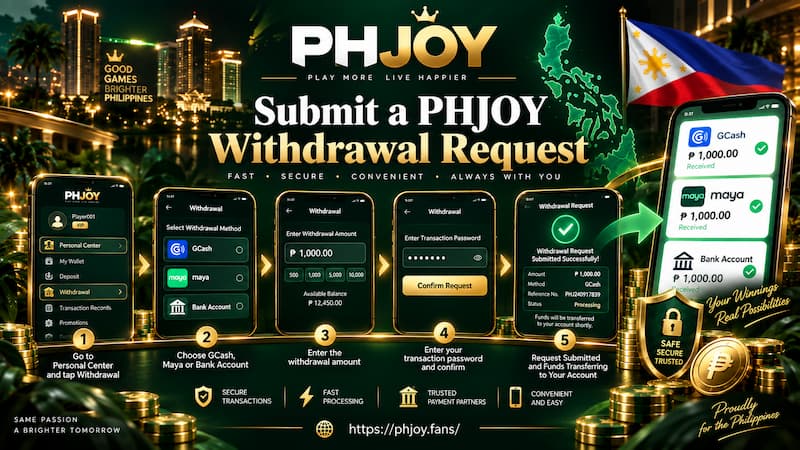
Submit a PHJOY Withdrawal Request
Once the wallet and balance are correct, the actual submission process is short.
Submit a PHJOY Withdrawal Request
Withdrawal Steps
- Open Personal Center.
- Select Withdrawal.
- Choose GCash or Maya.
- Check Available Amount.
- Select a preset value or enter an amount from ₱100 to ₱20,000.
- Enter the Transaction Password.
- Recheck the wallet and withdrawal amount.
- Press Submit.
That last review is worth a few seconds. A ₱1,000 request to the intended GCash account is easy to confirm. Correcting the wrong wallet after submission can be much less convenient.
Check the Daily Withdrawal Counter
The current form can display Remaining Number of Withdrawal Today: 20 near the Submit button.
Read this as the remaining allowance shown for the account at that moment rather than as a permanent rule for every account forever. Operational limits can change, so the number visible in your account should take priority.
Track the Request After Submission
A Recent Withdrawal panel sits beside the form. This is the first place to check after sending a request.
If there has not been a recent transaction, the panel may show No Withdrawal Request. The More button gives access to additional withdrawal records.
This becomes especially useful when the wallet has not updated as quickly as expected. Instead of immediately sending the same amount again, check whether the original request already appears in the withdrawal record.
Consider a simple case: You submit ₱2,000 to Maya, return to the wallet and do not see the money immediately. Before creating another ₱2,000 request, check Recent Withdrawal. A duplicate request can create a completely different balance situation from a single delayed payment.
Withdrawal Schedule and Account Conditions
A successful submission depends on more than having money in Central Wallet.
Current Operating Schedule
PHJOY’s published withdrawal information lists the operating period as 23:00 to 22:55, leaving a short daily interruption.
Treat that as the currently published schedule rather than a permanent guarantee. Maintenance or operational changes can temporarily affect availability. If the withdrawal form is unavailable around the interruption period, waiting for the service window to reopen is more sensible than repeatedly reloading the account.
Verification and Wagering Requirements
Two conditions deserve attention before assuming a withdrawal problem is technical:
- Account verification: Additional checks may be required if account information has not been completed or confirmed.
- Bonus wagering: Promotional funds can carry turnover requirements that affect how much appears under Available Amount.
This is where Central Wallet and Available Amount become especially useful. A player may see a healthy wallet balance while only part of it is currently eligible for withdrawal.
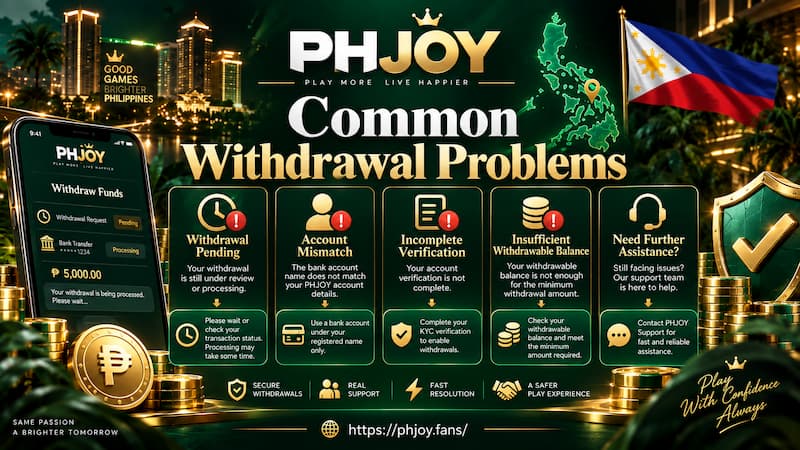
Common Withdrawal Problems
Most withdrawal issues are easier to diagnose when you check the form in the right order.
Common Withdrawal Problems
Available Amount Is Zero
Start with the balance instead of the Submit button.
Check whether:
- Funds are still connected to an active game wallet.
- The balance needs refreshing.
- A bonus wagering condition is unfinished.
- Account verification requires attention.
If Available Amount stays at zero, choosing different preset amounts will not change the basic problem.
Submit Is Unavailable
Go through the form from top to bottom:
- Is GCash or Maya selected?
- Is the amount at least ₱100?
- Is it no more than ₱20,000?
- Is the amount within Available Amount?
- Has the Transaction Password been entered?
- Is withdrawal currently available?
This sequence is faster than changing several account settings at once without knowing which one matters.
A Request Does Not Arrive Immediately
First check Recent Withdrawal and the full transaction record. Avoid assuming the request failed simply because the receiving wallet has not updated yet.
If the request appears in your account history, keep that record available when contacting customer support. The amount, selected wallet and transaction status give support staff something specific to investigate.
Withdrawal Checklist Before You Submit
A good cash-out routine is short:
- Confirm GCash or Maya is the intended wallet.
- Check Available Amount, not only Central Wallet.
- Keep the request within the visible ₱100–₱20,000 range.
- Make sure the Transaction Password is ready.
- Check the remaining daily withdrawal count.
- Confirm any bonus wagering requirement has been completed.
- Review Recent Withdrawal before repeating a request.
- Recheck the amount and wallet before pressing Submit.
The current values inside your account should always be the final reference. Withdrawal limits, operating hours and account allowances can change, while the active form reflects the conditions you are dealing with at the time.